Keep marks for precision, hide them to compare the design without changing your input, and remove them only when you mean to edit the source text.احتفظ بالحركات للدقة، وأخفها لمقارنة التصميم من دون تغيير النص، ولا تزلها إلا عندما تقصد تعديل الأصل.
What are Harakat, and why do they change a design?ما الحركات، ولماذا تغيّر شكل التصميم؟
Harakat are small marks above or below Arabic letters, including Fatha, Damma, Kasra, Sukun, Shadda, and Tanween. They can guide pronunciation, but also add visible height and space to a line.الحركات علامات صغيرة توضع فوق الحروف العربية أو تحتها، مثل الفتحة والضمة والكسرة والسكون والشدة والتنوين. قد تساعد على النطق أو إزالة الالتباس، لكنها تضيف أيضاً ارتفاعاً ومساحة إلى السطر.
Their position and shape vary by typeface. Text that fits in one font may approach the edge in another, so test the real phrase at its final size.يختلف موضع الحركات وشكلها من خط إلى آخر. قد يبدو النص مريحاً بخط ثم يقترب من الحواف بخط آخر، لذلك يجب اختبار العبارة الحقيقية داخل المقاس النهائي.
- Harakat change the visible height of the text.تؤثر الحركات في الارتفاع المرئي للنص.
- They may require more padding and line spacing.قد تحتاج إلى هامش وتباعد أسطر أكبر.
- Their clarity depends on the font, size, and background.يعتمد وضوحها على الخط والحجم والخلفية.
When should you keep the marks?متى تحتفظ بالحركات؟
Keep Harakat when they are an important part of the text or help readers pronounce it correctly. This is useful for educational material, ambiguous names, and wording that needs linguistic precision.احتفظ بالحركات عندما تكون جزءاً مهماً من النص أو عندما تساعد القارئ على النطق الصحيح. يفيد ذلك في المواد التعليمية والأسماء التي قد تُقرأ بأكثر من طريقة والنصوص التي تتطلب دقة لغوية.
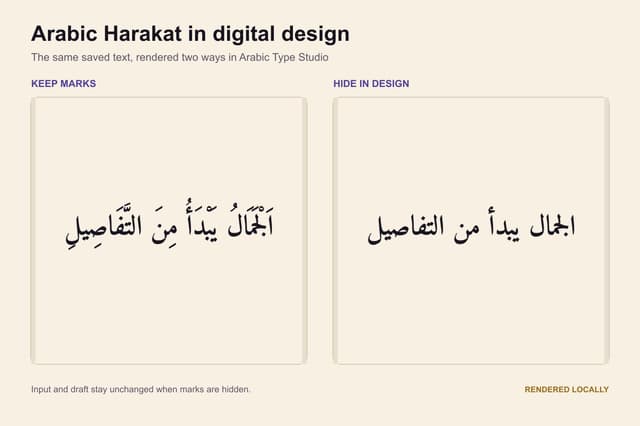
Keep marks preserves the input, preview, PNG, and SVG exactly as entered. The tool does not add missing marks or verify whether they are correct.يعني خيار «الاحتفاظ» أن النص في حقل الإدخال والمعاينة وملف PNG أو SVG يبقى كما كتبته. لا تضيف الأداة حركات جديدة ولا تراجع صحتها.
- Test the font with the actual marked text.اختبر الخط بالحركات الفعلية لا بكلمة خالية منها.
- Check Shadda combined with Fatha, Damma, or Kasra.راجع الشدة مع الفتحة أو الضمة أو الكسرة.
- Open the export and check that upper and lower marks are not clipped.تأكد من عدم قص العلامات العلوية والسفلية في الملف المصدّر.
When should you hide them in the design?متى تخفي الحركات في التصميم؟
You may want to preserve the source input while displaying a visually simpler version. Hide in design lets you compare a heading or name with and without marks without losing the original.قد ترغب في الاحتفاظ بالنص الأصلي داخل المحرر مع عرض نسخة أبسط بصرياً. يفيد خيار «إخفاء في التصميم» عند مقارنة عنوان أو اسم قصير مع الحركات ومن دونها من غير فقدان الأصل.
Hiding affects only the preview and exported design. The entered text and local draft retain the marks, and you can switch back to Keep at any time.يؤثر الإخفاء في المعاينة والتنزيل فقط، بينما يبقى النص المكتوب والحفظ المحلي محتفظين بالحركات. يمكنك العودة إلى خيار الاحتفاظ في أي وقت.
- Compare both versions at the same size and in the same font.قارن النسختين بالمقاس نفسه والخط نفسه.
- Do not assume hiding preserves meaning or pronunciation in every case.لا تفترض أن الإخفاء يحافظ على المعنى أو النطق في كل حالة.
- Request a language review for permanent or sensitive text.اطلب مراجعة لغوية إذا كان النص دائماً أو حساساً.
When should you remove them from the text?متى تزيل الحركات من النص؟
Use Remove from text only when you intend to change the underlying text, not just its appearance. It removes supported basic marks from primary and secondary lines and can be reversed immediately through Undo.استخدم «إزالة من النص» فقط عندما تريد تعديل النص نفسه، لا مجرد مظهره. تحذف العملية الحركات الأساسية المدعومة من السطر الرئيسي والسطر الثانوي، ويمكن التراجع عنها مباشرة عبر سجل Undo.
Removal is more permanent than hiding and may make a word ambiguous. Keep a copy of the marked text or try Hide first if you are uncertain.الإزالة أكثر ديمومة من الإخفاء، وقد تجعل بعض الكلمات قابلة لأكثر من قراءة. احتفظ بنسخة من النص المشكول أو استخدم الإخفاء أولاً إذا لم تكن متأكداً.
- Review the text before leaving the page or clearing the draft.راجع النص قبل مغادرة الصفحة أو مسح المسودة.
- Confirm names and important wording with a fluent Arabic speaker.تأكد من الاسم أو الصياغة مع متحدث عربي متمكن.
- Do not use removal as a substitute for proofreading.لا تستخدم الإزالة بديلاً عن التدقيق اللغوي.
Adjust padding and line spacingاضبط الهامش وتباعد الأسطر
Fatha, Damma, Shadda, and dagger Alif need room above letters, while Kasra and other marks need room below. If a mark approaches an edge, increase padding before reducing font size.تحتاج الفتحة والضمة والشدة والألف الخنجرية إلى مساحة فوق الحروف، بينما تحتاج الكسرة وبعض العلامات إلى مساحة أسفلها. إذا اقتربت العلامات من الحافة، زد الهامش قبل تقليل حجم الخط.
For multi-line text, increase line spacing gradually so marks do not collide with the next line. Leave more room when using an outline or shadow.في النص متعدد الأسطر، زد تباعد الأسطر تدريجياً حتى لا تتداخل حركات سطر مع السطر المجاور. أضف مساحة إضافية أيضاً عند استخدام ظل أو حد خارجي.
- Begin with generous padding and reduce it after checking.ابدأ بهامش أوسع ثم قلّله بعد المعاينة.
- Inspect the top and bottom edges, not only the sides.راجع أعلى اللوحة وأسفلها، لا الجانبين فقط.
- Test PNG and SVG in the destination app.اختبر PNG وSVG في التطبيق الذي ستستخدمه.
Choose a font and size that keep marks clearاختر خطاً وحجماً يحافظان على الوضوح
Some Naskh fonts handle diacritics clearly in reading text, while geometric or display fonts may work better for a short phrase at a large size. No single rule fits every phrase.بعض خطوط النسخ مصممة للتعامل مع الحركات بوضوح، بينما قد تكون الخطوط الهندسية أو العرضية أنسب لعبارة قصيرة وبحجم كبير. لا توجد قاعدة واحدة تناسب جميع العبارات.
If marks feel crowded, try a clearer font or larger size before removing them. Check letter dots as well because nearby marks can create visual confusion.إذا بدت الحركات مزدحمة، جرّب خطاً أوضح أو حجماً أكبر قبل حذفها. راقب النقاط أيضاً حتى لا تختلط بصرياً مع العلامات القريبة.
What does the tool remove?ما الذي تزيله الأداة، وما الذي تتركه؟
The control handles Fatha, Damma, Kasra, Tanween, Sukun, and Shadda within U+064B–U+0652, plus dagger Alif at U+0670. It does not remove Tatweel, Hamza, or letter dots.يعالج التحكم الأساسي الفتحة والضمة والكسرة والتنوين والسكون والشدة ضمن النطاق U+064B–U+0652، إضافة إلى الألف الخنجرية U+0670. لا يزيل التطويل أو الهمزة أو نقاط الحروف.
It does not cover every Quranic annotation or specialized Arabic combining character. Review specialized text character by character and do not treat a design tool as comprehensive linguistic cleanup.لا تشمل العملية جميع علامات المصاحف أو كل المحارف العربية المركبة. إذا احتوى النص على علامات متخصصة، راجع النتيجة حرفاً حرفاً ولا تعامل أداة التصميم كتدقيق لغوي شامل.
Checklist before downloadقائمة مراجعة قبل التنزيل
Read the wording first, then review it as a design. Confirm that Keep, Hide, or Remove is intentional and that the preview matches the final PNG or SVG.اقرأ النص أولاً، ثم راجعه كتصميم. تأكد من أن اختيار الاحتفاظ أو الإخفاء أو الإزالة مقصود، وأن المعاينة تطابق ملف PNG أو SVG النهائي.
This tool styles text only. It does not translate, add Harakat, or check spelling or meaning. Ask a fluent Arabic speaker to review permanent, religious, trademark, or tattoo use.هذه الأداة تنسّق النص فقط؛ لا تترجم ولا تضيف الحركات ولا تتحقق من الإملاء أو المعنى. للنصوص الدائمة أو الدينية أو العلامات التجارية أو الوشوم، اطلب مراجعة متحدث عربي متمكن.
- Review the original wording and marks.راجع النص الأصلي والحركات.
- Test font, size, padding, and line spacing.اختبر الخط والحجم والهامش وتباعد الأسطر.
- Open the exported file in its destination app.افتح الملف المصدّر في التطبيق المستهدف.
- Keep an editable copy before permanent use.احتفظ بنسخة يمكن تعديلها قبل الاستخدام الدائم.